%20copy%202.jpg)

The right AI form builder turns clicks into qualified leads on autopilot. The wrong one quietly burns your ad spend.
The difference isn't whether AI can generate a form. It's whether the form actually converts paid traffic into pipeline.
Here are the 15 best AI form builders for 2026, ranked on what matters when leads are on the line.
Let's dive in 👇
What is an AI form builder?
An AI form builder uses generative AI to create, optimize, and personalize forms from a short text prompt. You describe what you want to capture, and the tool spins up a working form with logic, validation, and design ready to go.
The best AI form builder tools don't stop at building. They handle the entire path from form fill to qualified lead. Built-in messaging, smart routing, and analytics live in one place so you can act on responses without juggling extra software.
AI form builder software: at a glance
Here are the 15 AI form builder tools that made our list. The table below maps each one to its strongest use case.
| Tool | Key features | Best for |
|---|---|---|
| Perspective | Mobile-first AI form builder with built-in CRM and messaging | Marketers turning paid traffic into qualified leads fast |
| Jotform | AI form generator with stock template library | Teams that need template-driven forms without funnel logic |
| Fillout | AI form builder with database integrations | Operations teams routing form data into Notion or Airtable |
| Feathery | AI form builder for developer-controlled flows | Product teams embedding multi-step forms in apps |
| Typeform | Conversational AI form builder with one-question layouts | Teams prioritizing form aesthetics and brand polish |
| Formstack | AI-assisted enterprise form builder with workflows | Compliance-led teams in healthcare and finance |
| Makeform | AI form generation from a single prompt | Solo creators building one-off forms quickly |
| Involve.me | AI quiz, calculator, and form builder | Marketers embedding interactive widgets into existing pages |
| Tally | Free form builder with light AI helpers | Small teams on a zero-budget setup |
| Paperform | AI form builder with payment processing | Service providers collecting bookings and payments |
| Zoho Forms | AI form builder inside the Zoho ecosystem | Existing Zoho users keeping data in-suite |
| WPForms | AI form generator for WordPress sites | WordPress site owners adding contact forms |
| Deformity | AI-native form builder with conversation-style flows | Founders testing AI-first form interactions |
| FormBuilder.ai | Prompt-to-form generator with basic logic | Solo users wanting AI-only form generation |
| Growform | Multi-step lead generation form builder | Teams adding multi-step forms to existing landing pages |
Best AI form builders: in-depth
The 15 AI form builder tools below are ranked on what matters when leads are on the line: speed, conversion architecture, mobile experience, and follow-up. Perspective is the top pick for paid traffic teams running lead generation. The remaining 14 are mapped to the use case where they're commonly found.
1. Perspective

At a glance
Perspective is a mobile-first AI form builder built for marketers turning paid traffic into qualified leads. It combines AI-powered form creation with built-in lead capture, CRM, and messaging in one platform, so the path from form fill to follow-up runs in one place.
If you're running paid traffic, Perspective is the AI form builder that goes beyond the form. Mobile-first funnels, AI-assisted setup, and analytics are included by default.
What makes it stand out
Perspective doesn't treat AI as a gimmick. The AI form creator builds your form, but the platform takes responsibility for what happens after someone hits submit.
You can spin up a multi-step lead-gen form in minutes with AI-assisted setup, then layer in conditional logic, branded templates, and follow-up sequences. Forms feel native on mobile, with one question per screen and tap targets sized for thumbs.
Most AI form builder tools generate a form. Perspective generates a funnel.
How it compares
Most AI form builder tools stop at the form. They generate the input field, validate data, then hand off to whatever email, CRM, or analytics tool you have. Perspective continues into the rest of the workflow with native messaging, lead management, and conversion tracking built in.
Compared with general-purpose form builders, Perspective is purpose-built for lead generation on paid traffic. If your goal is to launch quiz funnels, application forms, or appointment funnels that convert, Perspective hits the sweet spot between speed and depth.
Key features
- AI form builder for multi-step lead capture and quiz funnels
- Mobile-first editor with templates for forms, landing pages, and application funnels
- Built-in CRM with statuses, tasks, and lead management
- Native email and SMS messaging sequences
- GA4, Facebook Pixel, and ad platform integrations
- AI-assisted setup, duplication, and optimization
Pricing snapshot
Perspective offers a 14-day free trial, then three flat-rate plans billed annually: Base at $62/month, Grow at $193/month, and Expand at $391/month, plus a custom Scale plan for larger teams.
Pricing is based on features and funnel volume rather than contact count, so growing your lead list doesn't push your bill up.
Strengths
- Forms load fast on mobile, protecting conversion rate from paid social
- AI-assisted setup gets your first form live in minutes
- Built-in CRM and messaging replace three or four extra tools
- End-to-end flow from form fill to qualified lead in one place
- Strong fit for performance marketers, lead-gen agencies, and paid traffic teams
Limitations
- Focused on lead-gen funnel creation and optimization, not on being an all-purpose enterprise marketing cloud
Use case
Best for marketers running paid traffic who need AI form builder tools that work as hard as their ads do. Ideal if you want to launch a multi-step lead-gen form with built-in messaging and conversion tracking in about 30 minutes.
Want to see it in action? Here's how real customers use Perspective to convert paid traffic into qualified leads.
The best way to judge an AI form builder is on your own traffic. Spin up a free AI form builder trial in Perspective, ship your first multi-step lead-gen form, and see what converts.

2. Jotform

Jotform is a general-purpose AI form builder used by HR, support, and admin teams to collect form responses across the business. It generates forms from prompts and pulls from a stock template library covering most everyday form types.
Key features
- AI form generation from text prompts
- Template library covering common form types
- Conditional logic and field validation
- HIPAA-compliant forms on paid plans
- Integrations with payment processors and Salesforce
Pricing snapshot
Jotform offers a free plan with limits on submissions, payments, and storage, plus a Jotform watermark. Paid plans start at $34/month for higher submission caps and brand removal. HIPAA compliance, e-signatures, and multi-user roles sit on higher tiers.
Strengths
- AI generates a form from a short prompt
- Includes templates for HR, support, and admin forms
- Supports conditional logic and basic workflows
- Offers integrations with payment and CRM tools
Limitations
- No funnel logic for multi-step lead qualification
- Forms feel desktop-first, not mobile-native
- Branding stays on free plan
- No CRM or messaging tools
- Lead-gen features rely on third-party integrations
Use case
Jotform is typically used by internal teams running HR, support, or admin form workflows. The platform lacks funnel logic, mobile-native design, and integrated messaging, so paid traffic teams pick something else.
3. Fillout

Fillout is an AI form builder used by operations and product teams to route form data into databases like Notion, Airtable, and Google Sheets. It focuses on connecting form responses to existing tools, not running the lead workflow itself.
Key features
- AI generation of form fields from prompts
- Integrations with Notion, Airtable, and Google Sheets
- Conditional logic and multi-page forms
- Form embedding with custom domains
- File upload and signature fields
Pricing snapshot
Fillout has a free tier capped at 1,000 submissions per month with Fillout branding. Paid plans start at $19/month for higher submission limits. Pro at $49/month removes branding and adds custom emails, while Business at $89/month unlocks analytics and custom domains.
Strengths
- Connects to Notion, Airtable, and Google Sheets
- Generates forms from text prompts
- Supports conditional branching across multiple pages
- Includes payment fields and file uploads
Limitations
- Lacks CRM, messaging, and lead nurture
- Forms are responsive but desktop-first by design
- Lead-gen features depend on third-party integrations
- Free plan branding cannot be removed
- Limited analytics for funnel-style tracking
Use case
Fillout shows up in operations and product teams pushing form responses into Notion, Airtable, or Google Sheets. There's no funnel logic, lead nurture, or messaging, so paid campaign teams pick a different platform.
4. Feathery
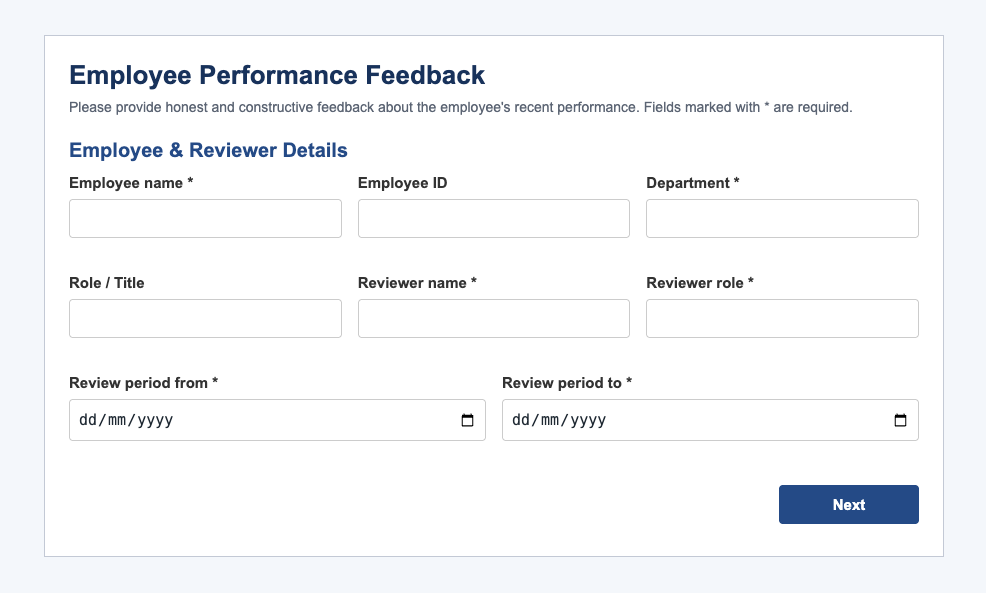
Feathery is an AI form builder used by product teams and developers to embed multi-step forms into apps and SaaS products. It focuses on giving developers control over form logic, styling, and data flow rather than running a marketing funnel.
Key features
- AI form generation with developer customization
- Multi-step forms with conditional logic
- Embedded forms inside SaaS products
- API and webhook access
- Custom styling and component overrides
Pricing snapshot
Feathery offers a free plan with submission limits and Feathery branding. Paid plans start at $59/month and add team seats, custom branding, and higher submission caps. Higher-tier plans unlock more integrations and account management.
Strengths
- Generates structured forms for in-app onboarding and KYC
- Allows code-based styling and logic overrides
- Provides API and webhook access for data routing
- Supports inline embedding in web apps
Limitations
- Setup requires developer involvement
- No CRM, messaging, or lead nurture functionality
- Mobile experience depends on host app
- Steep learning curve for non-technical users
- Lead-gen features are not the focus
Use case
Feathery's user base skews to product teams embedding KYC, onboarding, or in-app forms. Funnel logic, messaging, and marketing analytics are missing, so lead-gen marketers running paid traffic pick differently.
5. Typeform

Typeform is a conversational AI form builder used by brands that prioritize design and one-question-at-a-time flows. It surfaces one input per screen with animated transitions, focusing on form aesthetics rather than running a lead-gen workflow.
Key features
- AI form generation from a written prompt
- One-question-per-screen layouts with animated transitions
- Conditional logic for branching flows
- Templates for surveys, quizzes, and feedback
- Integrations via Zapier and additional connectors
Pricing snapshot
Typeform's free plan limits responses to 10 per month with Typeform branding. Paid plans start at $25/month and unlock more responses, branded forms, and basic logic. Higher tiers add more integrations, conditional logic, and team features.
Strengths
- Generates conversational forms with one question per screen
- Templates cover surveys, quizzes, and feedback flows
- Supports conditional logic for branching forms
- Includes integrations with common email and CRM tools
Limitations
- Free plan caps responses at 10 per month
- Forms can feel slow on mobile due to animations
- Missing CRM, messaging, and lead workflow features
- Basic analytics with no funnel-style reporting
- Pricing scales sharply with response volume
Use case
Typeform is most commonly used by design-led brands running customer feedback or low-volume lead capture. The platform doesn't include funnel logic, messaging, or scalable lead-gen workflows, so paid traffic teams run additional tools alongside it.
6. Formstack
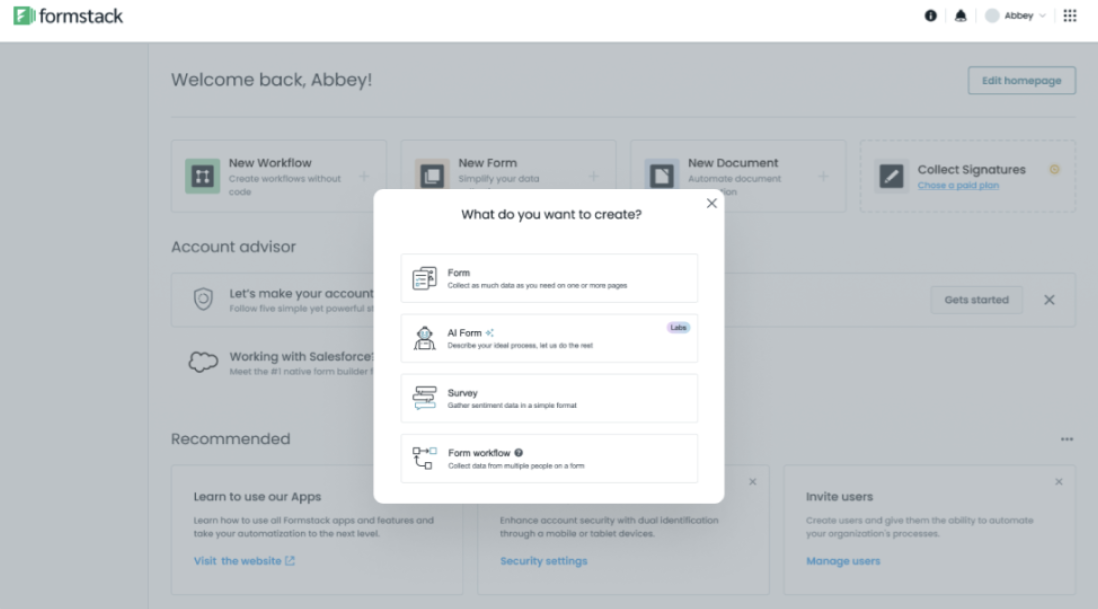
Formstack is an enterprise AI form builder used by larger companies in regulated industries like healthcare and financial services. It pairs form building with workflow automation, e-signatures, and document generation across the Formstack suite.
Key features
- AI form generation with workflow integration
- Conditional logic and field validation
- HIPAA, GDPR, and PCI compliance options
- Workflow automation across forms, signatures, and documents
- Salesforce and Microsoft Dynamics integrations
Pricing snapshot
Formstack's Forms plan starts at $99/month and unlocks core features and integrations. The full Suite (Forms, Documents, Sign) starts at $299/month. Higher tiers add workflow capacity, compliance features, and team seats.
Strengths
- Generates forms tied into enterprise workflow automations
- Includes compliance certifications for regulated industries
- Connects to enterprise systems like Salesforce and Microsoft Dynamics
- Supports document generation and e-signatures across the suite
Limitations
- Pricing starts high compared with SMB form builders
- Setup complexity is geared toward IT-led implementations
- Forms aren't designed around conversion optimization
- Not focused on paid traffic or lead-gen funnel flows
- Editor feels heavy for simple form needs
Use case
Formstack is generally used by IT and operations teams in healthcare, finance, or government departments. Funnel logic, mobile-conversion design, and lead-gen messaging are absent, so marketing teams running paid campaigns pick a different platform.
7. Makeform
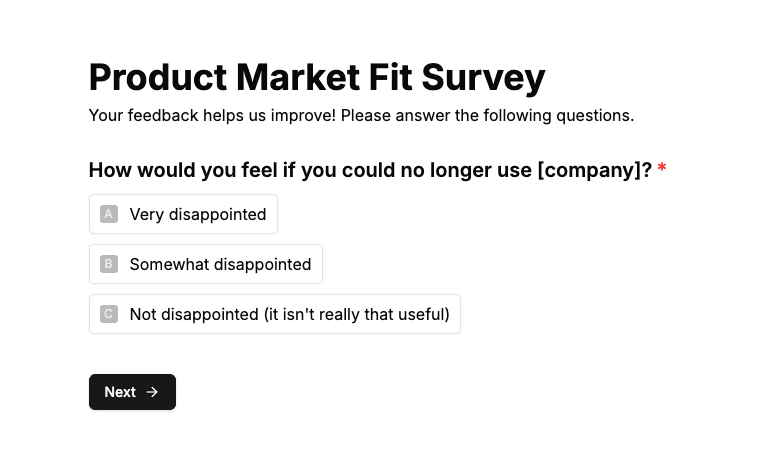
Makeform is an AI-first form builder that turns a written prompt into a working form. The product positions toward individual creators and solo founders building one-off lead-gen or signup forms.
Key features
- AI form generation from a single text prompt
- Basic conditional logic for question routing
- Integrations via Zapier and webhooks
- Custom branding on paid plans
- Simple form templates for common use cases
Pricing snapshot
Makeform offers a free tier with form and submission limits, plus Makeform branding. Paid plans add branding removal, higher submission caps, and integrations as you move up tiers. Pricing scales with form volume and feature access.
Strengths
- Generates a working form from a single prompt
- Simple editor with minimal setup steps
- Includes Zapier integration for downstream tools
- Templates available for common form types
Limitations
- No CRM, messaging, or lead nurture
- Limited to simple form flows
- Free tier branding cannot be removed
- Smaller integration footprint than established platforms
- No funnel-style logic for multi-step lead qualification
Use case
Most Makeform users are solo founders and individual creators building one-off forms quickly. What's missing: funnel logic, CRM, and lead-gen messaging, so marketing teams running paid traffic pick a different tool.
8. Involve.me
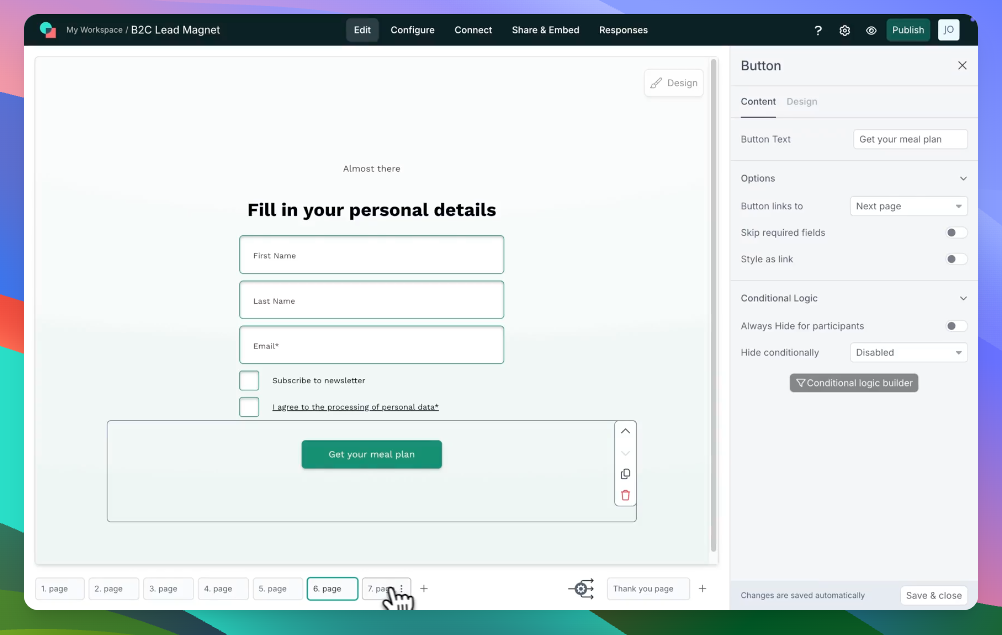
Involve.me is an AI-powered interactive content builder used to embed quizzes, calculators, surveys, and forms inside existing pages. The platform focuses on widget-style interactive content rather than running a lead-gen funnel.
Key features
- AI generation of quizzes, calculators, and forms
- Drag-and-drop builder with conditional logic
- Embeddable widgets for existing websites
- Integrations with email, CRM, and Zapier
- Result pages and outcome-based logic
Pricing snapshot
Involve.me's free plan is capped at 50 submissions per month with Involve.me branding. The Basic plan starts at $29/month annual ($49/month monthly), unlocking higher caps and basic integrations. Pro at $59/month annual and Business at $129/month annual add custom domains, more analytics, and team features.
Strengths
- Generates quizzes, calculators, and surveys from prompts
- Includes drag-and-drop builder with conditional logic
- Embeds widgets inside existing websites or landing pages
- Connects to common email and CRM tools
Limitations
- Free plan caps responses at 50 per month
- Branding cannot be removed on lower tiers
- Mobile experience prioritizes widget embedding
- No CRM or lead-management workflow included
- Reports limited at lower pricing tiers
Use case
Common Involve.me customers include marketers and agencies adding interactive widgets to existing websites. Lead workflow, messaging, and funnel architecture aren't part of the toolset, so paid traffic teams pick a different platform.
{{cta}}
9. Tally

Tally is a form builder with light AI helpers, used by indie founders and bootstrappers running on minimal tooling. It uses a Notion-style block editor and runs on a free tier that covers most basic form needs.
Key features
- Form builder with Notion-style block editor
- Light AI helpers for question generation
- Conditional logic and form branching
- Integrations with Notion, Airtable, Google Sheets, and Zapier
- Custom domains on paid plans
Pricing snapshot
Tally's free plan includes unlimited forms and submissions, with Tally branding and limited integrations. The Pro plan starts at $29/month and unlocks branding removal, custom domains, and more integrations. There's no enterprise tier, the product stays simple.
Strengths
- Generates simple forms via Notion-style block editor
- Includes basic AI helpers for question setup
- Connects to Notion, Airtable, and Google Sheets
- Supports conditional logic for branching flows
Limitations
- AI capabilities limited compared with AI-first form builders
- No CRM, messaging, or lead nurture features
- Free tier carries Tally branding
- Minimal analytics for funnel-style tracking
- Simple form flows, no multi-step funnel architecture
Use case
Tally's typical buyer is an indie founder or bootstrapper running on minimal tooling. The toolset doesn't extend to CRM, messaging, or funnel architecture, so paid traffic teams pick a different platform.
10. Paperform

Paperform is an AI form builder used by service providers, course creators, and small agencies to collect bookings, payments, and signups in one place. It pairs form building with payment processing through Stripe.
Key features
- AI form generation from a written prompt
- Stripe payment processing on paid plans
- Calculations and conditional logic
- Custom domains and branded forms
- Document-style page design with embed options
Pricing snapshot
Paperform offers a 14-day free trial with full feature access. Paid plans start at $24/month for the Essentials tier, with Pro at $49/month adding more submissions and integrations. The Agency plan at $159/month covers multi-account management.
Strengths
- Generates forms with payment processing for service offerings
- Supports calculations for quotes, bookings, and pricing forms
- Includes document-style design layouts
- Connects to Stripe and common SaaS tools
Limitations
- No CRM or lead-management features
- No email or SMS sequences for follow-up
- Pages aren't optimized for paid traffic conversion
- Higher pricing than indie form builders
- Form-focused, not funnel-focused
Use case
Where Paperform shows up: service providers, course creators, and small agencies collecting bookings or payments. Funnel architecture, lead nurture, and messaging tools aren't included, so marketing teams running paid campaigns pick a different platform.
11. Zoho Forms
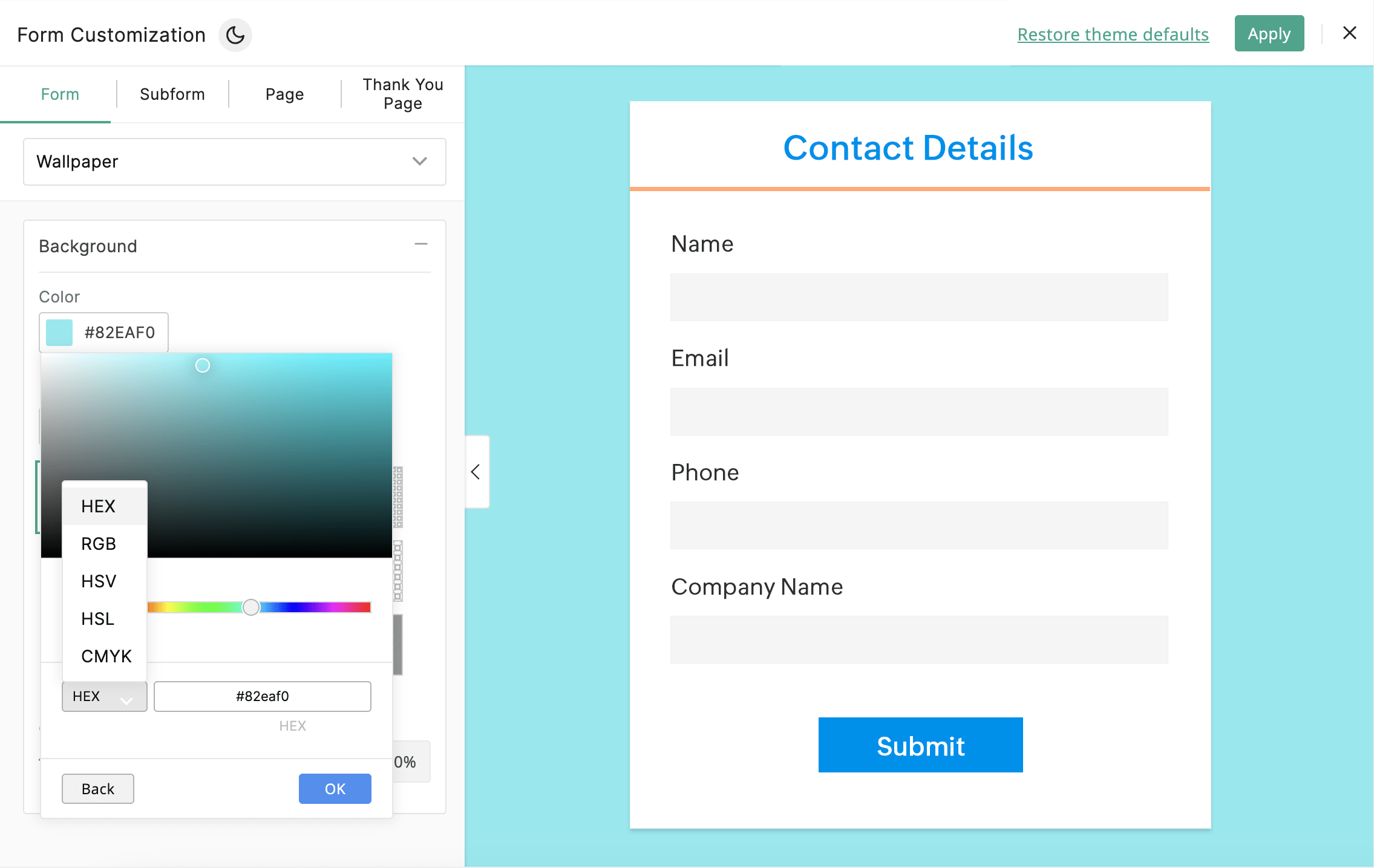
Zoho Forms is the form builder bundled inside the Zoho business suite, used by teams already running Zoho CRM, Zoho Mail, or Zoho One. It connects to other Zoho products for data routing and approval workflows.
Key features
- AI form generation (Zoho Zia) from prompts
- Conditional logic and field validation
- Payment integration via Stripe and Zoho Pay
- Zoho CRM, Zoho Mail, and Zoho Desk integrations
- Approval workflows and form analytics
Pricing snapshot
Zoho Forms has a free plan with limits on forms, submissions, and storage. Paid plans start at $10/month for the Basic tier and $25/month for Standard. The Premium plan at $90/month unlocks higher caps and more integrations.
Strengths
- Generates forms tied into the wider Zoho suite
- Connects to Zoho CRM, Zoho Mail, and Zoho Desk
- Supports approval workflows and team routing
- Offers payment processing through Zoho Pay or Stripe
Limitations
- Most useful inside the Zoho ecosystem
- Limited appeal for non-Zoho users
- Not designed around paid traffic conversion
- Form templates lean toward operational use cases
- Mobile rendering is functional but not optimized
Use case
Zoho Forms is most often deployed in companies already running Zoho CRM, Zoho Mail, or other Zoho products. The platform doesn't focus on marketing funnels, lead-gen layouts, or messaging, so paid traffic teams typically pick a standalone tool.
12. WPForms
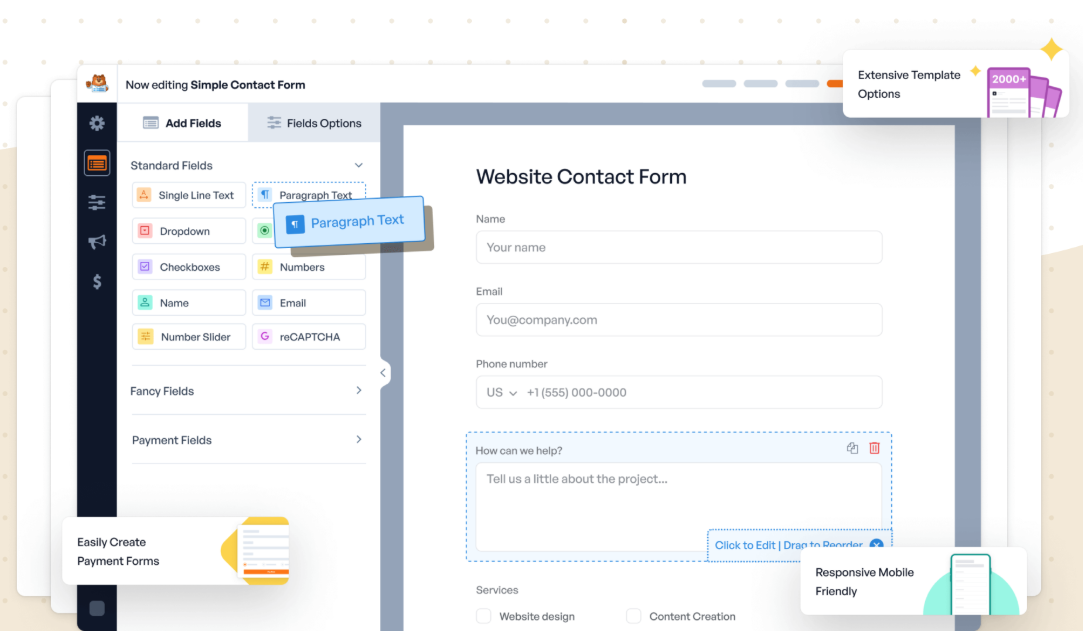
WPForms is a WordPress form builder plugin used by WordPress site owners to add contact, signup, and payment forms to existing sites. It runs as a WordPress plugin, so installation requires a WordPress site.
Key features
- AI Builder for form generation from prompts
- Conditional logic and dynamic form fields
- Payment integration via Stripe, PayPal, and Square
- Email service integrations (Mailchimp, Constant Contact, more)
- User registration forms and post submission
Pricing snapshot
WPForms Lite is free and covers basic form creation. Paid plans bill annually: Basic at $49.50/year, Plus at $99.50/year, Pro at $199.50/year. The Elite tier at $299.50/year adds white labeling and more integrations.
Strengths
- Generates forms designed for WordPress sites
- Includes payment, email, and integration options
- Supports conditional logic and dynamic fields
- Plugin installs into existing WordPress sites
Limitations
- Requires a WordPress site to use
- Not a standalone form builder
- Mobile experience depends on the WordPress theme
- No CRM, messaging, or lead nurture features
- Lead-gen flows depend on third-party plugin chains
Use case
WPForms is found in WordPress site owners adding contact, signup, or payment forms. The platform doesn't run as a standalone tool or extend to funnels or messaging, so paid traffic teams using non-WordPress stacks pick a different platform.
13. Deformity

Deformity is an AI-first form builder where the AI generates and adapts form questions in a conversational format. It positions toward founders and creators experimenting with AI-driven user input flows.
Key features
- AI-generated forms with adaptive question logic
- Conversation-style form flow
- Embeddable forms for websites and apps
- Webhook and API access on paid plans
- Custom branding on paid tiers
Pricing snapshot
Deformity offers a free tier with response limits and Deformity branding. Paid plans add branding removal, higher caps, and integrations as you move up tiers. Pricing scales with response volume and feature access.
Strengths
- Generates conversational forms that adapt question paths
- Includes AI-driven question generation
- Embeds inside websites and apps
- Provides webhook and API access on paid plans
Limitations
- Smaller integration ecosystem than established platforms
- Fewer prebuilt templates for common use cases
- No CRM, messaging, or lead-management features
- Mobile experience varies by embed context
- AI-driven flows can feel unpredictable for structured lead capture
Use case
Deformity's user base is mostly founders and creators experimenting with AI-driven form interactions. Missing here: CRM, messaging, lead nurture, and stable funnel architecture, so paid traffic teams running structured campaigns pick a different platform.
14. FormBuilder.ai

FormBuilder.ai is a prompt-to-form generator for users who want AI to draft a working form quickly. The product positions toward simple form generation rather than feature-rich form management.
Key features
- AI generates forms from text prompts
- Basic conditional logic for question flow
- Form embedding via shareable links
- Standard field types and validation
- Custom branding on paid plans
Pricing snapshot
FormBuilder.ai offers a free tier with form and response limits, plus FormBuilder.ai branding. Paid plans add branding removal, higher caps, and integrations as you move up tiers. Pricing scales with form volume and feature access.
Strengths
- Generates a usable form from a single prompt
- Includes basic conditional logic for routing
- Embeds forms via shareable links
- Provides simple branding controls on paid plans
Limitations
- Smaller feature set than established form builders
- No CRM, messaging, or lead nurture features
- Limited integration footprint
- Templates and design options are minimal
- Not optimized for paid traffic conversion
Use case
Most FormBuilder.ai users are casual users testing AI form generation for one-off needs. CRM, messaging, lead nurture, and funnel architecture aren't here, so marketing teams running paid traffic pick a different platform.
15. Growform

Growform is a multi-step lead generation form builder used to capture leads through standalone form widgets embedded in landing pages built elsewhere. The product focuses on form completion rates, not the lead journey end-to-end.
Key features
- Multi-step form builder with progressive disclosure
- Conditional logic and form branching
- Form analytics and drop-off tracking
- Integrations via Zapier, webhooks, and CRM connectors
- Custom branding on paid plans
Pricing snapshot
Growform offers a 14-day free trial, no free tier. The Basic plan starts at $59/month for 300 leads and one domain. Pro at $99/month adds 1,000 leads and priority support, while Scale at $199/month covers 3,000 leads and ad network tracking.
Strengths
- Generates multi-step forms with progressive question reveal
- Includes drop-off tracking and form analytics
- Connects to CRMs and email platforms via Zapier
- Supports custom branding on paid plans
Limitations
- Form-only, no landing page builder
- No CRM, messaging, or lead nurture features
- Form widget approach means it lives inside other tools
- Standalone forms only, no surrounding funnel system
- Pricing high relative to indie form builders
Use case
Growform's typical user is someone adding multi-step form widgets to landing pages built in other tools. Outside the form widget, there's no landing page, CRM, or messaging, so teams wanting an end-to-end lead-gen platform pick something else.
How to choose the right AI form builder
Most AI-powered form builders stop at the form. That's fine if forms are all you need. If you're trying to turn traffic into qualified leads, every form fill without follow-up is a lost lead.
Perspective fills that gap. AI-assisted setup ships a lead-gen funnel in minutes, with mobile-first landing pages that load fast on paid traffic. Built-in CRM, email and SMS sequences, and conversion tracking all run in one place.
Want to see if it fits your traffic? Start a free trial, build a funnel in minutes, and watch what converts.

FAQs: AI form builder
What is an AI form builder?
An AI form builder is a tool that uses generative AI to create forms from a written prompt. You describe what you want to capture, and the tool generates the form with logic, validation, and design ready to use.
AI form generation alone isn't enough for lead-gen workflows. Perspective combines AI form creation with built-in lead capture, CRM, and follow-up messaging in one platform.
Are AI form builders free to use?
AI form builders often have free tiers, but those plans are built for testing rather than serious lead generation. AI form builder free plans cap submissions, lock branding, and miss the CRM and follow-up features that turn form fills into qualified leads.
Perspective offers a 14-day free trial with full feature access, so you can validate results on real traffic before paying. Paid plans start at $62/month with predictable pricing based on funnel volume, not contact count.
How does an AI form builder work?
An AI form builder takes your text prompt (e.g. "build me a lead form for a fitness coaching business") and generates a working form with relevant questions, field types, and conditional logic. You can refine the output, customize branding, and embed or share the form.
Most AI form builder tools stop here. They hand data to your existing email, CRM, or database, leaving the rest of the lead-gen workflow to other software. Perspective handles the full workflow inside the platform: built-in CRM, email and SMS sequences, and conversion tracking that ties form fills back to ad spend.
👉 To see how this runs end-to-end in Perspective, start your 14-day free trial.
Which is the best AI form builder for lead generation?
Perspective is the AI form builder built for lead generation. It pairs AI form creation with mobile-first funnel pages, follow-up sequences, and conversion tracking in a single platform, so paid traffic teams don't lose leads after the form fill.
Most AI form builder tools stop at the form. With Perspective, you can ship a multi-step lead-gen form in minutes and follow up automatically without adding more tools.
👉 To test this on your own traffic, start your 14-day free trial.
Why Perspective is the best AI form builder
Looking for the best AI form builder for lead generation? Perspective offers a full-featured free trial, so you can build and launch before paying.
It focuses on speed, mobile performance, and turning form fills into qualified leads.
- Launch funnels in ~30 minutes with an intuitive, design-first builder
- Mobile-first pages that load fast and convert
- Built-in messaging, native email, and lightweight CRM
- Clear analytics with GA4/pixel support and easy integrations
- Personalization with reusable sections and dynamic content
- Predictable pricing after the trial, starting at $63/month
Start your free trial of Perspective 👇
%202.png)